Watermelon Web Works, LLC
  • 0 Shopping Cart
  • Home
  • Store
    • Browse All
    • Web Hosting
    • Register a New Domain
    • Transfer Domains to Us
  • Announcements
  • Knowledgebase
  • Network Status
  • Contact Us
  • More
  • Account
    • Login
    • Forgot Password?
  1. Portal Home
  2. Knowledgebase
  3. SiteWorx (Control Panel)
  4. SiteWorx Basic
  5. How to update your SiteWorx Email Address?

  Categories

Backup/Restore
4
Cloudflare (cPanel)
9
CloudLinux (cPanel)
10
cPanel - Control Panel
24
Databases
11
DNS - Nameservers
6
Domain Management
10
Email
1
Email
17
FTP
9
Mail Filters & SPAM
8
Mobile
11
Others
3
PayPal
7
Security
10
SiteWorx (Control Panel)
61
Softaculous
76
SSL
5
WHM
18
WordPress
17

  Categories

  Support

My Support Tickets
Announcements
Knowledgebase
Downloads
Network Status
Open Ticket

How to update your SiteWorx Email Address? Print

  • 0


If you want to change your SiteWorx email address, then follow these steps.

1. Log into your SiteWorx account. (eg: www.example.com:2443/siteworx/ )

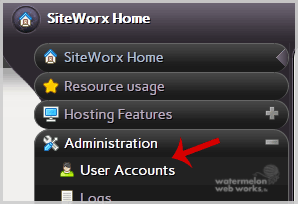
2. Under SiteWorx User Management, click the Administration menu item if it is not already open.

3. Click on User Accounts.
password-reset-user.gif

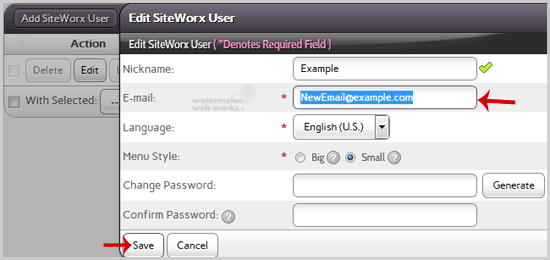
4. Under the Action option, Click the Edit button.

5. In the E-mail field, Enter your new email address.

6. Click the Save button.

email-edit.gif


Was this answer helpful?

Related Articles

How to Reset my InterWorx (SiteWorx) Account Password? After you access your SiteWorx account, follow these steps to reset your password:1. Log into... Change Language of your SiteWorx Account? SiteWorx supports a lot of languages, and if you want to change your SiteWorx language to your... How to Access AWStats in SiteWorx? 1. Log into your SiteWorx account. (e.g. www.example.com:2443/siteworx/ )2. Under SiteWorx Menu,... How to Access Webalizer in SiteWorx? 1. Log into your SiteWorx account. (e.g. www.example.com:2443/siteworx/ )2. Under SiteWorx Menu,... How to Edit file in the SiteWorx File Manager? 1. Log into your SiteWorx account. (e.g. www.example.com:2443/siteworx/ )2. Under SiteWorx Menu,...
« Back

  Support

My Support Tickets
Announcements
Knowledgebase
Downloads
Network Status
Open Ticket
  • Contact Us
  • Terms of Service

Copyright © 2026 Watermelon Web Works, LLC. All Rights Reserved.


Loading...
Loading...

Choose Currency

$ USD
$ CAD

Generate Password

Please enter a number between 8 and 64 for the password length