
Watermelon Web Works, LLC
  • 0 Shopping Cart
  • Home
  • Store
    • Browse All
    • Web Hosting
    • Register a New Domain
    • Transfer Domains to Us
  • Announcements
  • Knowledgebase
  • Network Status
  • Contact Us
  • More
  • Account
    • Login
    • Forgot Password?
  1. Portal Home
  2. Knowledgebase
  3. Email
  4. Outlook 2019
  5. How to Reply to an Email in Outlook 2019?

  Categories

Backup/Restore
4
Cloudflare (cPanel)
9
CloudLinux (cPanel)
10
cPanel - Control Panel
24
Databases
11
DNS - Nameservers
6
Domain Management
10
Email
1
Email
17
FTP
9
Mail Filters & SPAM
8
Mobile
11
Others
3
PayPal
7
Security
10
SiteWorx (Control Panel)
61
Softaculous
76
SSL
5
WHM
18
WordPress
17

  Categories

  Support

My Support Tickets
Announcements
Knowledgebase
Downloads
Network Status
Open Ticket

How to Reply to an Email in Outlook 2019? Print

  • 0

You can reply to emails using Outlook 2019 instead of cPanel Webmail.

1. Open Outlook 2019.

Outlook-2019-icon.gif


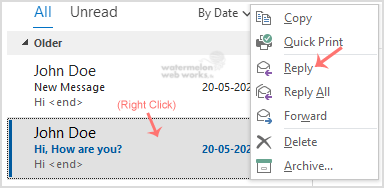
2. Right click on the email you would wish to reply to.
Outlook-reply-email.gif

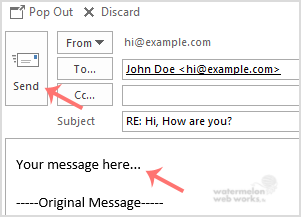
3. On the right side, the response box will open. Enter your message and click Send.
Outlook-reply-final.gif


Was this answer helpful?

Related Articles

How to Set up a cPanel Email Account with Outlook 2019? ? You can set up a cPanel email account with Microsoft Outlook 2019 and manage your email... How to Send Email Using Outlook 2019? ? You can send email using Outlook 2019. It is quite straightforward because you do not need to... How to Forward Email in Outlook 2019? ? You can forward the email to other email accounts using Outlook 2019. ? 1. Open Outlook... How to Delete Email Messages in Outlook 2019? ? If you want to remove email from Outlook 2019, you can easily do so. However, if you use POP,... How to Check for New Email in Outlook 2019? ? 1. Open Outlook 2019. ? 2. In the left panel, you can see a list of your email accounts....
« Back

  Support

My Support Tickets
Announcements
Knowledgebase
Downloads
Network Status
Open Ticket
  • Contact Us
  • Terms of Service

Copyright © 2026 Watermelon Web Works, LLC. All Rights Reserved.


Loading...
Loading...

Choose Currency

$ USD
$ CAD

Generate Password

Please enter a number between 8 and 64 for the password length